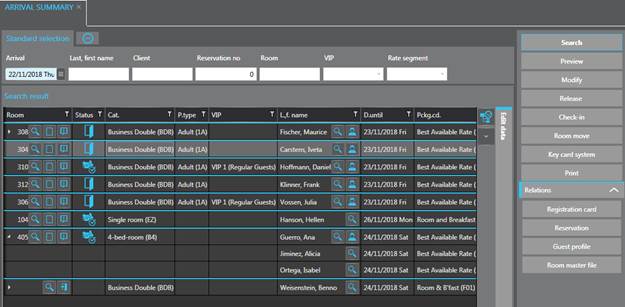
The three summaries for arrivals, in house guests and departures can be called up for the current date or for a date in the future or of the past.
Ø Enter the search criteria as required (e.g. all guests on a particular package or guests of a certain client only).
Ø Click Search in the function pane.
SIHOT displays the guests arriving, in house or departing on the requested date in the list box Search results.
Figure 11: Arrival summary
Ø Highlight a guest in the listbox.
Ø Open the expander Edit data to modify the reservation, room allocation or guest details.
Use the buttons in the function pane to carry out the following functions:
•Print reports
Use the button Preview to produce a number of different reports and print them, if required. The reports include all data in the listbox, i.e. if you’ve searched for the arrivals of a specific client, for example, then the report will only list the guests of this client.
•Allocate a room or release an allocation
You can remove an existing room allocation or use the automatic room allocation function as required by clicking the respective buttons.
•Check the guest in
•Cancel the check in (arrived guests only)
For further information refer to “Front Office Functions – Check-in – Cancel check-in.
•Plan a room move
For further information refer to Planning a future room move.
•Carry out a room move (arrived guests only)
For further information refer to Carry out a room move.
•Print the registration card
For further information refer to “Front Office Functions – Check-in – Registration card.
•Open the reservation
•Open the guest profile
•Open the room master file of the allocated room
•Open guest or client account (arrived guests only)
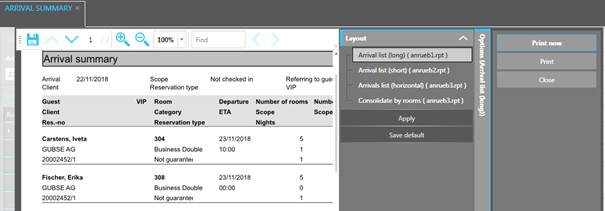
Figure 12: Reporting in arrival summary