 ) to further narrow down your search or to
search for different fields.
You can use different search parameters to search for a particular reservation in SIHOT.
Ø In the Reservation-layout, click Reservation search in the function pane.
SIHOT opens the window Reservation search.
Ø The tab Standard selection contains the most commonly used search parameters, for example the period of the guest’s stay, client or guest name, etc.
•If you disable the parameter Referring to guest, the search will include client data only.
•Enable Referring to guest if you want to include the rooming lists entries in the search as well.
Use the extended search parameters (tab ) to further narrow down your search or to
search for different fields.
TIP:
When searching for a cancelled
reservation, ensure that the search parameter Definitive/tentative includes all
bookings.
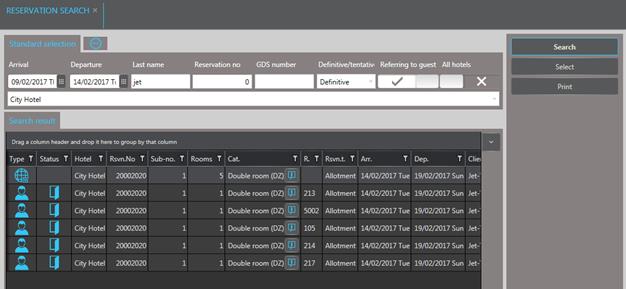
Figure 114: Reservation search
NOTE: In searches using the parameter Assignment, SIHOT will always display the reservation without any assignment together with those that have the requested assignment.