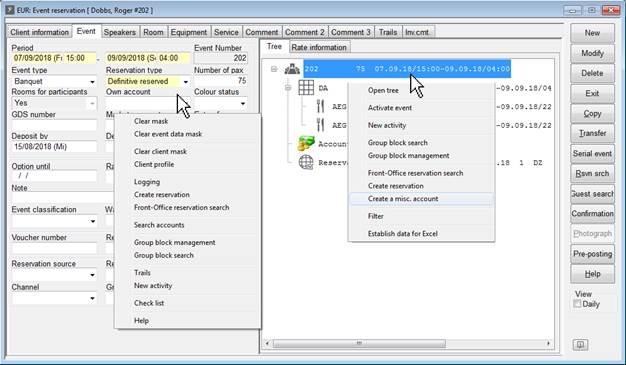
There are two different context menus in the event reservation dialog:
1. in the left part of the dialog on the opened tab (e.g.
2. in the event tree
Figure 66: Different context menus in the event reservation
|
Context Menu Event Reservation Tab | |
|
Clear mask |
The entire dialog is emptied and the pre-defined defaults are loaded. |
|
Clear event data mask |
The entries in the presently displayed tab (event, room, equipment, service, etc.) are emptied. |
|
Clear client mask |
Use this function to change the reservation’s client: the client data is removed, the remaining event remains. |
|
Client profile |
SIHOT opens the client’s profile. |
|
Logging |
SIHOT opens the logging-dialog to trace any changes to the reservation. |
|
Create reservation |
SIHOT opens the front office reservation dialog to enter accommodation requirements for the event. |
|
Front Office reservation search |
SIHOT opens the front office reservation search to select an existing reservation and link it to the event. |
|
Search accounts |
SIHOT opens the account search to select an existing account and link it to the event. |
|
Group block management |
SIHOT opens the allotment/group block management dialog to enter accommodation requirements in form of an allotment or group block for the event. |
|
Group block search |
SIHOT opens the allotment/group block search to select an existing allotment or group block and link it to the event. |
|
Trails |
SIHOT opens the trails of the event reservation, where you can check any spooled documents and/or enter activities related to the event. |
|
New activity |
SIHOT opens the activity-dialog. |
|
Check list |
SIHOT prints a full listing of the event. |
|
Help |
SIHOT opens the help file. |
|
Context Menu Event Tree | |
|
Open tree |
|
|
Activate event |
|
|
New activity |
SIHOT opens the activity-dialog. |
|
Group block search |
SIHOT opens the allotment/group block search to select an existing allotment or group block and link it to the event. |
|
Group block management |
SIHOT opens the allotment/group block management dialog to enter accommodation requirements in form of an allotment or group block for the event. |
|
Front Office reservation search |
SIHOT opens the front office reservation search to select an existing reservation and link it to the event. |
|
Create reservation |
SIHOT opens the front office reservation dialog to enter accommodation requirements for the event. |
|
Create a misc. account |
SIHOT creates a misc. account and links it to the event. |
|
Filter |
In functions lasting several days, you can highlight all aspects of the function on a selected date. |
|
Establish data for Excel |
The event data is exported into an .xml file for further processing. The file is stored in the SIHOT path (\export\excel). |