 next to the company name to see the full
hierarchy of companies including their contact persons.
next to the company name to see the full
hierarchy of companies including their contact persons.There are several ways to assign a guest to a company:
•Press the search-button and drag & drop the respective company from the list box.
•If the guest is entered on the rooming list of a company reservation, he will become a contact person of this company automatically.
A double click on the company opens the respective profile.
Remove the company by clicking on the field and pressing Del.
Also, a company profile may be assigned to a mother company, thus enabling you to manage a hierarchy of companies. To enter a mother company in a profile, press search. Highlight the mother company in the list box of the search and drag & drop into the field company name.
Press the contextsensitive button next to the company name to see the full
hierarchy of companies including their contact persons.
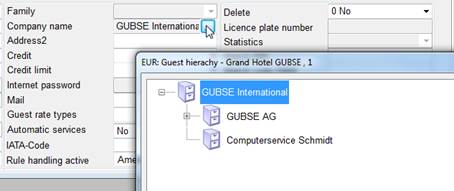
Figure 18: Company hierarchy