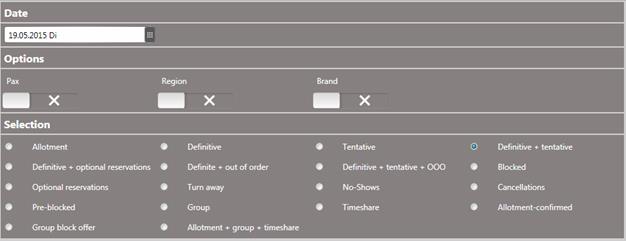
This summary in the menu Reports – Occupancy statistics gives an overview of the current occupancy figures for a 12-month period, starting from the month of the call-up date. The figures are calculated on the actual rooms sold. The summary can also be called up for the past by entering a backdating starting date.
The occupancy percentage is usually calculated with the following formula:
100 * (sold + blocked) / total
|
Options: | |
|
Pax |
Use this option to add the number of guests. |
|
Region, Brand |
In MPE-Installations, you can use this option to select specific regions and/or brands in the Extended selection pane. |
|
Selection: | |
|
Allotment |
Select the required type of analysis. |
|
Definitive | |
|
Tentative | |
|
Definitive + tentative | |
|
Definitive + optional reservations | |
|
Definitive + OOO | |
|
Definitive + tentative + OOO | |
|
Blocked | |
|
Optional reservations | |
|
Turn away | |
|
No-Show | |
|
Cancellations | |
|
Pre-blocked | |
|
Group | |
|
Timeshare | |
|
Allotment-confirmed | |
|
Group block offer | |
|
Allotment + group + timeshare | |
Figure 18: Calling up the report
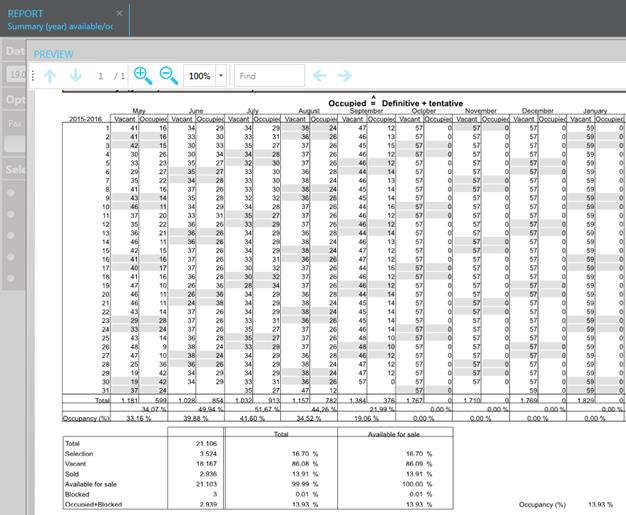
Figure 19: Report extract