 in the main menu.
You can record found items in SIHOT.Mobile and add a photo for immediate identification. The photos are also shown in the Lost and Found layout in SIHOT.PMS.
To record a newly found item, proceed as follows:
Ø Tap Lost and Found in the main menu.
Ø Tap the Add-button  .
.
SIHOT opens a dialog box to record the new item.
Ø Enter the item’s details and description.
Ø Tap the OK-button  to save the item.
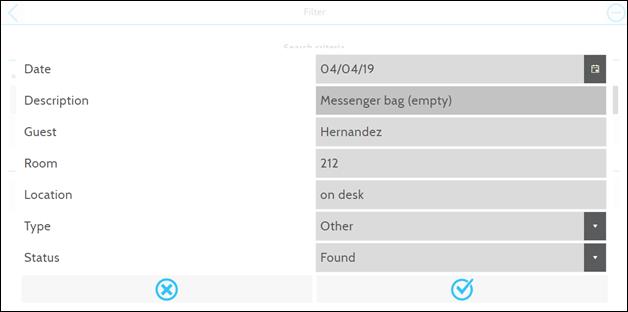
Figure 11: Recording a new item
SIHOT displays the list of lost and found items.
Ø To add a photo or video, tap the
Camera-button  .
.
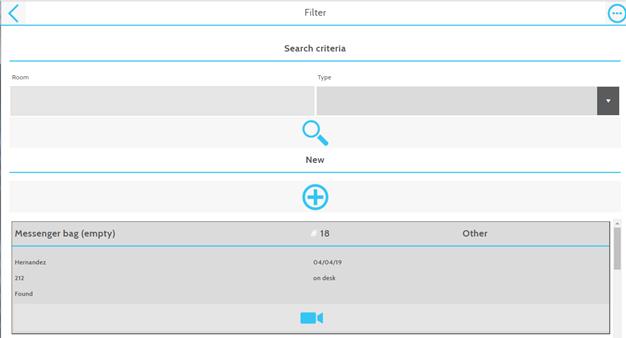
Figure 12: Record in lost and found list
SIHOT opens a dialog box to add a media.
Ø Tap Video or Photo  to launch the camera in your device.
Alternatively, select an existing photo or video from your device by tapping
File
to launch the camera in your device.
Alternatively, select an existing photo or video from your device by tapping
File  .
.
Ø Tap OK  to save the lost and found item.
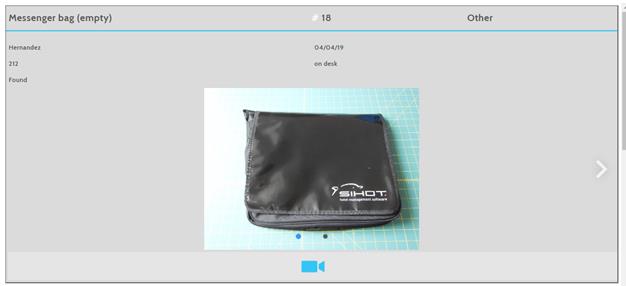
Figure 13: Lost and found item recorded in SIHOT.Mobile
The items are also immediately visible in SIHOT.PMS.
Ø For an enlarged view of the photo or to
watch the video, click the button  next
to the thumbnail.
next
to the thumbnail.
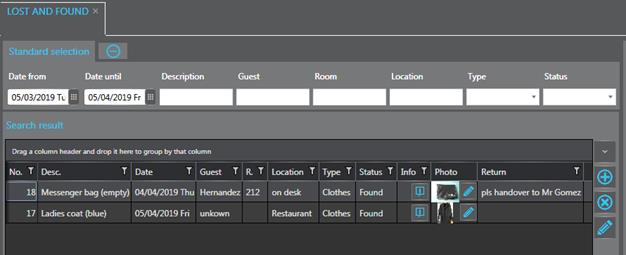
Figure 14: Lost and found items in SIHOT.PMS